Preview to see how this design looks on mobile

To see the instructions, switch to desktop.

COMING SOON
-43
:
-2
:
-58
Days
Hours
Minutes
Seconds
:
-34
WORLDWIDE
shipping
NEW STYLES JUST IN

Recreate this sticky scrolling section
Frequently asked questions
Follow the steps below to build this section with a sticky scroll and get a sense of what’s possible with Wix Studio.
5-10 mins
Scroll down to get started
_gif.gif)


Iconic Collection
Groups
- Paying members·0 members
 Paying members·0 members
 Public·1 member
 Public·1 member

Nature inspired, gentle, relaxed
Gentle Curves
Position the second element
PART 3/5
a.
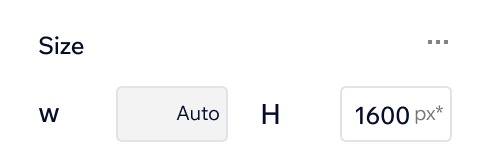
Click to select the section below. At the top of the Inspector panel under Size, set the height to 1600px*
b.

Select the container to the right and drag it into the section. Place it directly below the container you placed in the last step
c.

From the top of the Inspector panel, use the blue icon to align the container to the horizontal center

Assets for use
Iconic Collection
Nature inspired, gentle, relaxed
Gentle Curves

Balanced, clean, sculptural, zen
Tranquil Lines
Position the third element
PART 4/5
a.

Click to select the section below. At the top of the Inspector panel under Size, set the height to 2100px*
b.

Select the container to the right and drag it into the section. Place it directly below the container you placed in the step above
c.

Use the blue alignment icon at the top of the Inspector panel to align the container to the right
Assets for use
Iconic Collection
Nature inspired, gentle, relaxed
Gentle Curves
Balanced, clean, sculptural, zen
Tranquil Lines

Muted, natural, calming, revitalizing
Earth Tones
Set up the sticky scroll
PART 5/5
Set the title’s position
1
Set the position of each element
2
a.

In the section below, select the title. Scroll down to Position in the Inspector panel. Under Position type, change it to Sticky
b.

Next to Offset, set the offset value to 3%
a.
Select the first container. Scroll down to Position in the Inspector panel and change the Position type to Sticky
b.

Set the Offset value to 30%
c.
Repeat steps a and b for the other two containers
Click Preview to see how the effect turned out

Iconic Collection
Nature inspired, gentle, relaxed
Gentle Curves
Balanced, clean, sculptural, zen
Tranquil Lines
Muted, natural, calming, revitalizing
Earth Tones
Check out the section below to see the final design.
For more Sandboxes, go to the Wix Studio Academy.
Nature inspired, gentle, relaxed
Gentle Curves
Balanced, clean, sculptural, zen
Tranquil Lines
Muted, natural, calming, revitalizing
Earth Tones
Iconic Collection

MENU

CONTACT US